
Integrations & API
Your campaign data, wherever you need it
Access campaign metrics in the tools you already use through the API, and let AI assistants query your data in plain language.
REST API
Connect seamlessly to your entire stack
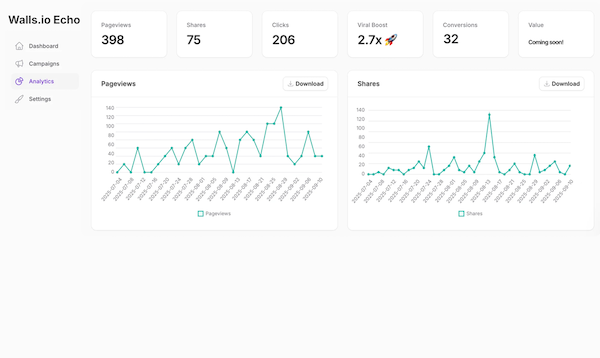
The Walls.io Echo REST API gives you programmatic access to everything you see in your dashboard: read your campaigns, their recent shares, and the full set of analytics - pageviews, shares, clicks, viral boost, and conversions - or create, update, and delete campaigns and folders right from your own tools. It returns clean JSON, so it plugs into any tool, script, or platform that can make an HTTPS request.
Up and running in three steps
-
Create a token
In your dashboard, go to Settings → API and create a personal access token - read-only, or read & write to manage campaigns and folders.
-
Authenticate
Send the token as a Bearer token in the Authorization header of your requests.
-
Make your first call
Start with GET /v1/campaigns to list your campaigns. That's it.
The API only ever operates on campaigns and folders owned by your account - and write access is a per-token opt-in.
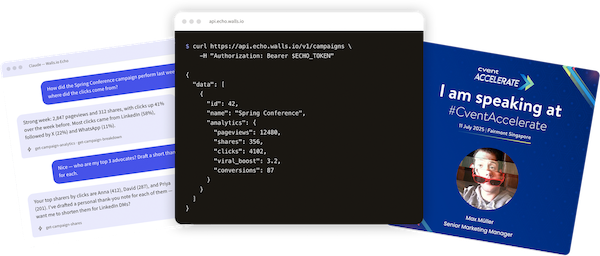
$ curl https://api.echo.walls.io/v1/campaigns \
    -H "Authorization: Bearer $ECHO_TOKEN"

{
  "data": [
    {
      "id": 42,
      "name": "Spring Conference",
      "analytics": {
        "pageviews": 12480,
        "shares": 356,
        "clicks": 4102,
        "viral_boost": 3.2,
        "conversions": 87
      }
    }
  ]
}
Feed your BI dashboards
Pull campaign metrics into Looker Studio, Power BI, Grafana, or your internal reporting stack, so Echo performance sits next to the rest of your marketing data.
Automate reporting
Schedule a script or a no-code workflow (Zapier, Make, n8n) that fetches last week's numbers every Monday morning and posts a summary to Slack or email.
Show live social proof
Display a live share counter or a "recently shared by" feed on your event or campaign website, powered by the shares endpoint.
Sync advocates to your CRM
Fetch a campaign's top sharers - with their click and conversion counts - and push them to HubSpot or Salesforce to follow up with your most effective ambassadors.
Monitor and alert
Poll the daily timeseries and trigger a notification when a campaign suddenly spikes - or stalls.
Read the full API reference
Every endpoint, all parameters, ready-to-copy code samples, and a built-in test console. Try it with your own token, straight from the browser.
MCP server
Talk to your campaigns in plain language
Walls.io Echo ships with an MCP server - a connector built on the Model Context Protocol, the open standard that lets AI assistants like Claude and ChatGPT securely work with your data. Paste one URL into your assistant, approve access in your browser, and you're connected. Nothing to install, no API keys to copy around.
Connection URL
https://mcp.echo.walls.io/mcp
Works with Claude, ChatGPT, and Claude Code.
How did the Spring Conference campaign perform last week - and where did the clicks come from?
Strong week: 2,847 pageviews and 312 shares, with clicks up 41% over the week before. Most clicks came from LinkedIn (58%), followed by X (22%) and WhatsApp (11%).
get-campaign-analytics · get-campaign-breakdown
Nice - who are my top 3 advocates? Draft a short thank-you note for each.
Your top sharers by clicks are Anna (412), David (287), and Priya (201). I've drafted a personal thank-you note for each of them - want me to shorten them for LinkedIn DMs?
get-campaign-shares
Analytics Q&A
"How did the spring conference campaign perform last week compared to the week before?" Your assistant pulls the numbers and answers in plain language.
Instant reports
"Summarise all my active campaigns in a table: pageviews, shares, clicks, viral boost, and conversions. Highlight the best and worst performer."
Find your top advocates
"Who are the 10 people whose shares generated the most clicks? Draft a thank-you message for each."
Create and edit campaigns
"Create a new campaign called October Product Launch, then copy the sharing texts from the spring campaign and adapt them for October."
Secure by design
The MCP server uses OAuth 2.1 - you never copy or paste a token, and the connection only ever accesses campaigns owned by your account. Review and revoke connected assistants anytime under Settings → Connected apps.
Read the MCP server docs
Step-by-step setup guides for Claude, ChatGPT, and Claude Code, plus the always up-to-date list of available tools.
More integrations
Canva, Google Drive and Dropbox today, more tomorrow
We're busy connecting Echo to more of the tools you use every day.
 Available now
Canva
Design your social sharing cards in Canva and use them directly in your Echo campaigns - no exporting and re-uploading.
 Available now
Google Drive
Pull sharing visuals straight from your Google Drive - your own folders, files shared with you, and your team's shared drives - or search across all of them at once.
 Available now
Dropbox
Pull sharing visuals straight from your Dropbox folders and the folders shared with you - or search your whole Dropbox at once.
Your favorite app?
More integrations are on our roadmap. Tell us which tools you'd like to connect Echo with - it helps us decide what to build next.
Tell us what you needYour next event deserves an Echo.
Most event promotion tools charge more for less. Echo comes as a subscription or a one-time package that covers your whole audience — no per-user, per-share, or per-campaign charges. You get the full toolkit:
Subscriptions
starting at
$800/month
One-time
starting at
$2,400